



Change manager
What is affected and what do I need to coordinate?
Sees dependencies, risks, owners and required actions before moving the change forward.
Change Impact connects change requests with processes, systems, data, teams and risks to estimate impact, prioritize mitigations and leave documented evidence before approval.
01 · Problem
In many organizations, the real impact appears late: after the change has already been approved, after a dependency fails, or after the affected team finds out.
Change Impact anticipates that work by connecting the request with processes, systems, data, owners, risks and dependencies before the decision is made.
In Service Operations, this helps to relate incidents with recent changes, prepare approvals, document impact, support CAB and audit change decisions with traceable evidence.
Before approving a change, EAFlow shows which services, processes, applications, vendors and SLAs could be affected.
02 · Change Impact Map
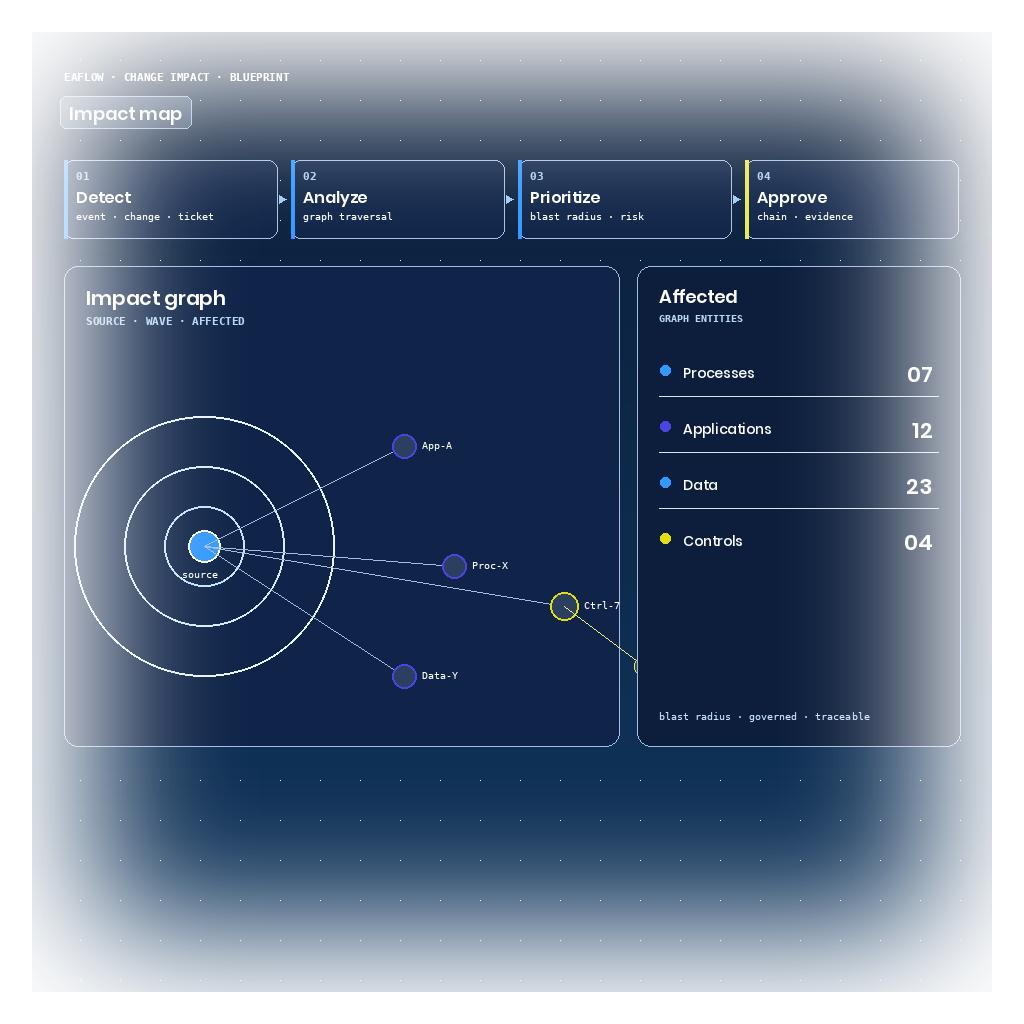
The map shows what the change touches, which risks it moves and which teams need to participate before approval.
It can also be read as a dependency graph: the relationships between the request, processes, systems, data, teams, risks and implementation milestones.
With those relationships, Change Impact returns a map, a score and a proposed roadmap so approval can be discussed with context.
03 · Deliverables
From the initial map to the execution roadmap, Change Impact turns scattered dependencies into concrete deliverables for approval, coordination and audit.
Visualizes the processes, systems, teams, data, dependencies and critical points affected by each request.
Summarizes scope, criticality, dependencies, risk and adoption effort so changes can be compared before approval.
Identifies operational, technology and organizational risks before resources are committed.
Turns the analysis into phases, owners, milestones, dependencies and progression criteria.
Documents the reason for the decision, assumptions, assessed impacts and required actions.
When to use
You do not need Change Impact if:
04 · Roles
Change Impact structures the conversation between the person coordinating the change, the person approving it and the person reviewing it later.
What is affected and what do I need to coordinate?
Sees dependencies, risks, owners and required actions before moving the change forward.
Can I approve this with enough evidence?
Compares impact, risk, criticality and mitigations before deciding.
Was the decision traceable and justified?
Accesses evidence, criteria, owners and state changes for later review.
05 · Implementation
We configure the first use case, impact criteria, approval rules and deliverables. Then we transfer documentation, criteria and operation so the team can sustain the practice.
Guided start
We configure the first change surface, impact criteria and critical entities that need to participate in the assessment.
Operating model
We define approval rules, metrics, evidence, owners and workflow so the analysis can be repeated.
Team handoff
We transfer documentation, criteria and training so the team can sustain the practice after assisted implementation.
Assisted implementation. Operation transferred to the customer team with documented criteria.
Where it applies
It applies in contexts where changes cross processes, systems, teams, controls and dependencies.
Existing tools
It does not replace existing ITSM, CMDB or workflow. It adds an impact, dependency and evidence layer so every approval has context before reaching the committee.
Workflow execution stays in the existing tools; Change Impact contributes the evidence packet beforehand: map, score, roadmap and risk matrix.
With Change Impact, teams can evaluate dependencies, risks and implementation effort before committing resources.
Change Impact is delivered as a packaged solution with assisted implementation on the EAFlow Operational Graph, and can integrate with the existing change management when customer scope allows.