


Document Owner
Uploads, updates and sends documents for review.
EAFlow governs living Quality and Food Safety Management System documents: SOPs, work instructions, procedures, records, forms, specifications and evidence.
Controls versions, approvals, publishing, traceability, Data Room and plant-floor QR codes, with reporting to monitor documents awaiting review, due dates and documentary exposure.
Max answers from current documents and official sources, not from drafts or obsolete versions.
Works on the customer’s official document repository — Microsoft 365/SharePoint or Google Workspace/Drive — per the integration scope defined.
Not another digital folder. Document evidence connected to the process.
SOPs, work instructions, records and specifications.
Review, approval, publishing and currency.
Version, fingerprint, watermark and owner.
Published evidence, access and current versions.
Backlog, due dates, exposure and bottlenecks.
Access to the current document from the operating line.
Questions over the content of published documents, with answers grounded in current evidence.
01 · Problem
In a CPG plant, the QMS lives across hundreds of SOPs, work instructions, policies, procedures, records, forms, specifications and evidence items scattered between SharePoint libraries, Google Drive units, local folders and parallel spreadsheets. The documents exist. What is missing is the ability to answer basic operational questions with confidence:
The QMS is not sustained by having documents. It is sustained by published, current, approved documents connected to the process.
Quality Document Management for CPG turns scattered documentation into current, traceable evidence connected to the process.
In Service Operations, the same capabilities support attention evidence, procedure documents, auditable annexes, current versions, approval records and documentation available for audit. Evidence does not stay as a loose attachment: it stays published, versioned, traceable and queryable from official sources.
02 · Operational context
A quality document should not live as an isolated file. In Quality Document Management for CPG, each document can be linked to its plant, process, activity, role, owner, control, audit, evidence and published version.
Every document stays linked to the process that uses it, the plant where it applies, the signer who approved it and the current version. The QMS stops being an inventory and becomes a living, queryable, auditable document layer.
How it works
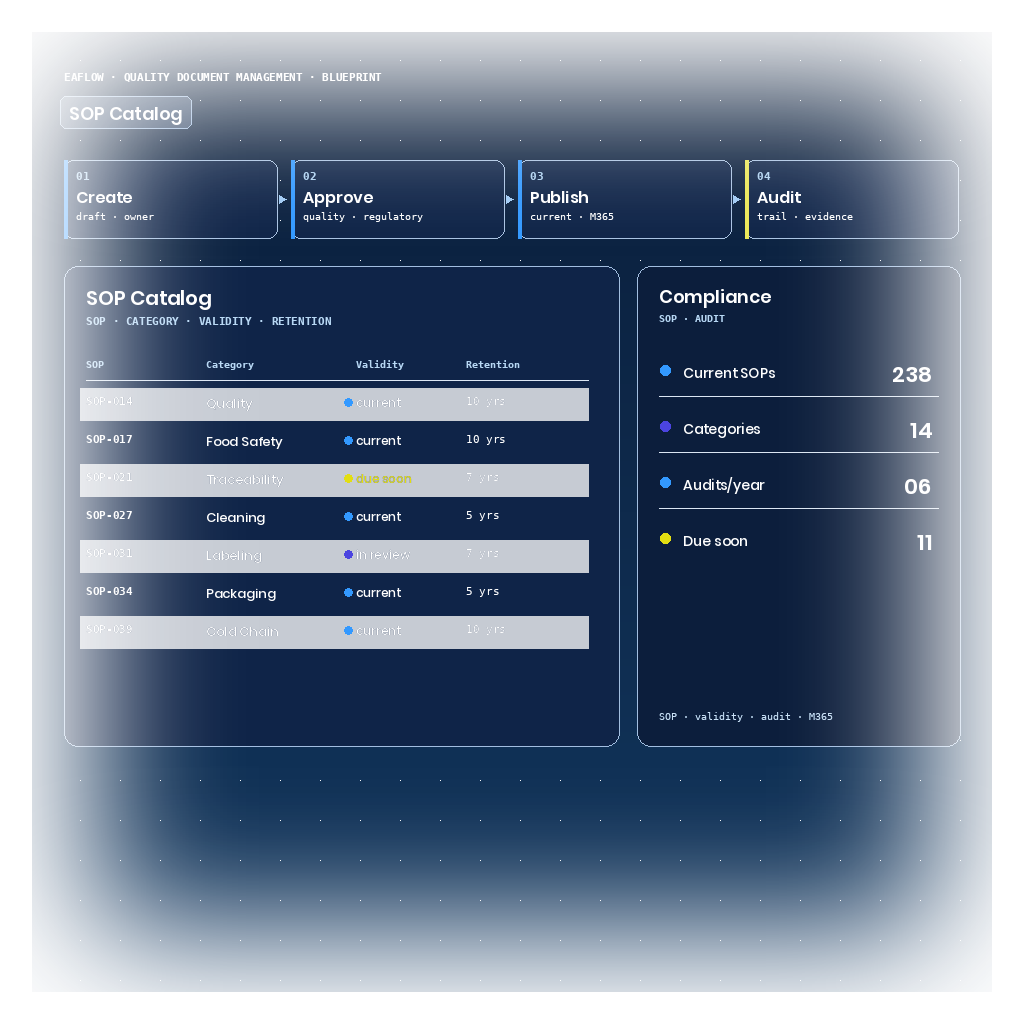
Quality Document Management for CPG operates on the existing official document repository. Each QMS document follows a traceable five-step lifecycle, configurable per type, plant and role.
New documents are uploaded to the official repository; existing ones are connected from Microsoft 365/SharePoint or Google Workspace/Drive per the agreed scope, without bulk file migration.
Each document is associated with the plant or line where it applies, the type (SOP, work instruction, policy, procedure, record, form, specification, evidence) and the operational process that uses it.
The configurable document workflow routes review and approval to the right role. State transitions are traced with signer, date and change reason.
Only approved content is published. Obsolete versions are retired without losing history, and the published document carries an explicit effective date, signer and approval traceability.
The published document becomes available for search, plant-floor QR access, Data Room, Auditor Mode and questions with Max over the current content.
The review, approval and publication journey lives next to the organization’s authorized document repository: files stay where they already are, and what is governed is the document’s state, who has to review it and what is missing before it can be published. An observation returned to the author is not an approval: the document stays in review until the corrected version is approved and published. When the finding requires a corrective action, the journey continues as non-conformance and corrective action, with owner, due date and verification of closure — an adjacent category of operation, supported by the same approved definitions in the graph.
Where a documentary finding opens a case with rules of its own — a named investigator, scoped access to the case file and an authorized owner who resolves it — that route is Domain Investigations and Nonconformities.
Reporting
Quality Document Management for CPG embeds dashboards and reports to monitor documentary health by plant, process, document type and owner.
The team can identify overdue documents or those due soon, critical unpublished items, missing evidence, unclassified documents, reviewer load, bottlenecks and documentary exposure before they turn into audit findings.
Visibility over published, under-review, overdue, due-soon, blocked, critical unpublished and unclassified documents.
Tracking of accessible evidence, current versions, traceability, formal approvals, auditor access, queries and exports.
Read on backlog, exposure per plant or subprocess, load per owner, bottlenecks and operational trend.
It is not just about having documents under control. It is about knowing where the documentary risk lives before the audit.
03 · What it supports
An industry accelerator on the EAFlow Operational Graph, designed for the QMS document lifecycle in CPG manufacturers — food & beverage, household products, personal care and packaged consumer goods. The nine capabilities cover the full flow from editing to publishing, audit and AI-assisted query.
Structures the document repository by plant, line or operating unit. Each document is associated with the plant where it applies, the responsible role and the current state.
Approval, review, retirement and replacement flows configurable per document type, plant or category. State transitions are traced with signer and date.
Only approved content is published. Obsolete versions are retired without losing history, and the published document carries explicit effective date, signer and traceability.
Every change is recorded with author, date and reason. Version comparison shows what changed in a policy, SOP or work instruction, not just when it changed.
Each document is linked to the process, activity, role or audit that uses it. A process change reveals which documents to update; a document reveals which processes depend on it.
Controlled view for external auditors: access to the current version, published evidence, approval history and traceability by process, without opening the full repository.
Monitors document backlog, overdue reviews, critical unpublished documents, accessible evidence, reviewer load, bottlenecks and exposure per plant or subprocess. The reporting layer allows the team to move from a reactive logic —looking for documents when the audit arrives— to a preventive one: knowing what needs review, approval, publishing or evidence before it turns into risk.
Every published document generates a stable QR code pointing to the current version. The plant operator scans and always sees the document approved today, not a local copy.
Lets the team ask natural-language questions over SOPs, work instructions, procedures, records, forms, specifications and published evidence. Max answers from current documents and official sources, helping find the relevant part of the document without exposing drafts or obsolete versions.
Works on the organization’s official document repository. Microsoft 365/SharePoint and Google Workspace/Drive are supported per the integration scope agreed during the engagement.
Examples
Process Knowledge applied
Each published document can be linked to the process, activity, role, plant, audit or evidence where it applies. The team does not just find files: it finds the current document in its operational context.
Max is not a generic search engine. It is a document chat over published evidence.
04 · Who runs it
Quality Document Management for CPG engages three roles around every document. Each role accesses the same governed repository from a different angle, per their responsibility.
Uploads, updates and sends documents for review.
Approves, publishes and controls document currency.
Queries published evidence without accessing drafts or internal work.
05 · Delivery
Quality Document Management for CPG works on the customer’s official document repository — Microsoft 365/SharePoint or Google Workspace/Drive — per the integration scope defined. The platform adds document governance, traceability, publishing, Data Room, QR access and query with Max without forcing the team to start from scratch.
Discovery
We map the in-scope document repositories — SharePoint libraries, M365 sites, Google Drive units or other official folders — and the critical QMS documents per plant, together with the processes, owners and audits each document supports. Scope is declared on the Operational Graph.
Connection
We connect the relevant document sources per the agreed scope. Microsoft 365/SharePoint and Google Workspace/Drive integrate when applicable; documents stay in their official repository, while workflow, versioning, approvals and process linkage live on the Operational Graph.
Adoption
We deploy Quality Document Management for CPG on the Operational Graph, configure approval, publishing and Data Room patterns relevant to the audit obligations, and transfer ownership so the QMS operates in the hands of the quality team.
Assisted implementation. Ownership transferred to the quality team at the end of the engagement.
06 · Supported scope
Quality Document Management for CPG covers the QMS document lifecycle. These are the supported capabilities, within the scope agreed in each engagement:
Quality Document Management for CPG helps Quality teams find, approve, publish, demonstrate and monitor current documents, connected to the process and available for operations, audit, executive reporting and query with Max.
Quality Document Management for CPG is an industry accelerator on the EAFlow Operational Graph, available through assisted implementation in the CPG documentary domain. Works on Microsoft 365/SharePoint or Google Workspace/Drive per the agreed scope, without migrating documents out of the official repository.